|
|
|
|
|
|
| Delphi Graphics: Algorithms |
| A. General Graphics | B. Color | C. Image Processing | D. Mathematics/Geometry |
Summary of Delphi Color Resources in article Delphi
Coloring Pages.
Also see Color Reference
Library.
| 1-bit color |  efg's Single-Bit
Bitmaps Lab Report
efg's Single-Bit
Bitmaps Lab Report | ||||||||||||||||||||||||||||||||||||||||||||||||||||||||||||||||||||||||||||||||||||||||||||||||||||||||||||||||||||||||||||||||||||||||||||||||||||||||||
| Achromatic and Colored Light | [Foley96, Chapter 13, pp. 563-604] | ||||||||||||||||||||||||||||||||||||||||||||||||||||||||||||||||||||||||||||||||||||||||||||||||||||||||||||||||||||||||||||||||||||||||||||||||||||||||||
| Additive/Subtractive Colors |  efg's Color Mix
Lab Report efg's Color Mix
Lab Report | ||||||||||||||||||||||||||||||||||||||||||||||||||||||||||||||||||||||||||||||||||||||||||||||||||||||||||||||||||||||||||||||||||||||||||||||||||||||||||
| Alpha Blending |
Alpha Blending Image Dissolve using Alpha Blending (with MMX Technology):
[non-Delphi] A graphics library, optimized for very fast 32-bit bitmap handling,
including alpha blending and antialiasing. | ||||||||||||||||||||||||||||||||||||||||||||||||||||||||||||||||||||||||||||||||||||||||||||||||||||||||||||||||||||||||||||||||||||||||||||||||||||||||||
| BMP to TXT | Example of how to convert BMP file to a TXT file of RGB values, and how to convert such a TXT file to RGB values in a TBitmap for display. | ||||||||||||||||||||||||||||||||||||||||||||||||||||||||||||||||||||||||||||||||||||||||||||||||||||||||||||||||||||||||||||||||||||||||||||||||||||||||||
| Brush Styles | See Brush
Styles on Delphi
Graphics VCL/RTL page
| ||||||||||||||||||||||||||||||||||||||||||||||||||||||||||||||||||||||||||||||||||||||||||||||||||||||||||||||||||||||||||||||||||||||||||||||||||||||||||
| CIE Chromaticity Diagram | [Foley96,
pp. 579-584, Plate II.1-II.2]
| ||||||||||||||||||||||||||||||||||||||||||||||||||||||||||||||||||||||||||||||||||||||||||||||||||||||||||||||||||||||||||||||||||||||||||||||||||||||||||
| Changing Color in Image | Pablo Pedrocca's UseNet
Post about how to make an image more blue
Bob Villiers' UseNet Post about how to change a single color in a pallete Ed Harmon's UseNet Post: Damon Chandler's (TeamB) UseNet Post about changing palette entry in pf8bit bmp
| ||||||||||||||||||||||||||||||||||||||||||||||||||||||||||||||||||||||||||||||||||||||||||||||||||||||||||||||||||||||||||||||||||||||||||||||||||||||||||
| Changing Color of Tab in PageControl | Peter Below's UseNet Post: "You have to
draw the tab yourself in this case, using the OnDrawtab event. Set the controls OwnerDraw property to true to get the event to fire." | ||||||||||||||||||||||||||||||||||||||||||||||||||||||||||||||||||||||||||||||||||||||||||||||||||||||||||||||||||||||||||||||||||||||||||||||||||||||||||
| CMYK | see CMYK on VCL/RTL page | ||||||||||||||||||||||||||||||||||||||||||||||||||||||||||||||||||||||||||||||||||||||||||||||||||||||||||||||||||||||||||||||||||||||||||||||||||||||||||
| Color Charts |  efg's Color
Charts Lab Report efg's Color
Charts Lab Report | ||||||||||||||||||||||||||||||||||||||||||||||||||||||||||||||||||||||||||||||||||||||||||||||||||||||||||||||||||||||||||||||||||||||||||||||||||||||||||
| Color Depth | When converting each 5-bit color component in a pf15bit bitmap to an 8-bit color component in a pf24bit bitmap, what happens with the "extra" 3 bits? See efg's UseNet Post about this. | ||||||||||||||||||||||||||||||||||||||||||||||||||||||||||||||||||||||||||||||||||||||||||||||||||||||||||||||||||||||||||||||||||||||||||||||||||||||||||
| Color Gradients | cworn's UseNet
Post with TGradient class and assembly code in the GetColorBetween
function
Jean-Yves Quéinec's demo program
showing gradient examples (TBitmap, TImage, TPaintBox) Peter Söderman's UseNet Post with example of using GradientFill API call 256-Color Mode: Since in 256-color video mode many video adapters use 18 bits/pixel, there are only 6 bits of red, green, and blue. (See COLORRES under GetDeviceCaps for the actual value). With only 6-bits of R, G, and B, only 64 distinct shades are possible. That is, 64 shades of gray are possible. Likewise, 64 shades of red are possible, etc. Lou's Tip "Simple
Gradient" Gradient Fill Ray Lischner's "Palettes Made Plain: Demystifying Microsoft Windows Palettes" shows gradient palette and palette animation demo, Delphi Informant, July 1998. GradBtn. Button that can have a gradient fill. HarmGradient. A TGraphicControl descendent. "Creating a gradient fill background," pp. 329-333 TGradientForm is a TForm descendant that paints its caption bar in a
gradient pattern Gradient Panel TCaptionControl. Adds a gradient to the form's caption, and allows you to add additional buttons to the caption. http://ourworld.compuserve.com/homepages/yaminov Create any combination of R, G, B color gradients in efg's Palette Lab or Scanline Tech Note See gradients used in Lyapunov and Fractals Show2 Lab Reports Also see "Spectrum/Rainbow". | ||||||||||||||||||||||||||||||||||||||||||||||||||||||||||||||||||||||||||||||||||||||||||||||||||||||||||||||||||||||||||||||||||||||||||||||||||||||||||
| Color Inverse | See Invert Colors | ||||||||||||||||||||||||||||||||||||||||||||||||||||||||||||||||||||||||||||||||||||||||||||||||||||||||||||||||||||||||||||||||||||||||||||||||||||||||||
| Color Management | Delphi support in beta! This
unit enables lcms for Delphi programmers. www.abaforum.es/martim/lcmsdlpy.zip lcms implements fast transforms between ICC profiles. Sample lcms application by Armindo Da Silva | ||||||||||||||||||||||||||||||||||||||||||||||||||||||||||||||||||||||||||||||||||||||||||||||||||||||||||||||||||||||||||||||||||||||||||||||||||||||||||
| Color Picker | VCL Component TColorDialog on Dialogs
palette
Here's how to use the MouseDown event of a TShape to define the TColorPicker brush color:
Mike Lischke's TColorPickerButton is a special speed button
which can be used to let the user select a specific color. The
control does not use the standard Windows color dialog, but uses a
popup window very similar to the one in Office97, which has been
improved a lot to support the task of picking one color out of
millions. Color Cop v4.0 converts RGB decimal values to RGB Hexadecimal Triplets.
It has a built in color picker, color preview, auto copy to clipboard, and
an eyedropper to choose colors anywhere on the screen. Color Cop can make
text and background colors very easy to manipulate in HTML documents. It
now has support for Delphi Hex codes.
| ||||||||||||||||||||||||||||||||||||||||||||||||||||||||||||||||||||||||||||||||||||||||||||||||||||||||||||||||||||||||||||||||||||||||||||||||||||||||||
| Color Property | Fingerpainting -- Building a Custom Color
Property Editor, Robert Vivrette, Delphi Informant, Nov
1996, pp. 26-35 http://www.informant.com/libs/delphi/2x/DI9611RV.ZIP | ||||||||||||||||||||||||||||||||||||||||||||||||||||||||||||||||||||||||||||||||||||||||||||||||||||||||||||||||||||||||||||||||||||||||||||||||||||||||||
| Color Reduction, Color Quantization |
Color reduction techniques for graphics (FAQ972D) Demonstrate the different color reduction options that can be used when
converting images with more than 256 colors to GIFs, www.melander.dk/delphi/gifimage;
Displaying a 24 bit True Color bitmap image on a 256 color display (FAQ 996D) by Joe Hecht Harm's UseNet Post with ConvertAndSave8BitBitmap Create8bitFrom 24bitBitmap in Robert Roßmair's UseNet Post Phil McRevis' UseNet Post with suggestion on best approach to reduce 24-bit pixels to 15-/16-bit pixels using Floyd-Steinberg dithering
efg's UseNet Post about converting 256-color bitmap to pf1bit | ||||||||||||||||||||||||||||||||||||||||||||||||||||||||||||||||||||||||||||||||||||||||||||||||||||||||||||||||||||||||||||||||||||||||||||||||||||||||||
| Color Spaces, Conversions | RGB and HSL Colour Models by Grahame
Marsh www.undu.com/DN971201/00000019.htm Collection of color utility routines
http://home.t-online.de/home/Robert.Rossmair/#rrColors [Foley96, pp. 585-587, Plate II.4] HLS: HSL
HSL, HSV/ HSB and RGB components HSV:
[Foley96, pp. 590-592, Plate II.7-II.8] GraphicEx: various color space conversions CMY, CMYK (subtractive color): L*a*b* L*u*v*: RGB Konvertierungen (RGB Conversions) XYZ:
YIQ: [Foley96, pp. 589-590] "Putting Colors in Order." A new method of looking at RGB color
space as Hue, Value and Chroma (HVC) Dr. Dobb's Journal, Issue
202, July 1993, page 40. efg's Color Reference Library | ||||||||||||||||||||||||||||||||||||||||||||||||||||||||||||||||||||||||||||||||||||||||||||||||||||||||||||||||||||||||||||||||||||||||||||||||||||||||||
| Color Usage |
Hitting the Highlights: Center Stage for Data-entry Controls, Delphi Informant, Jan 1998 | ||||||||||||||||||||||||||||||||||||||||||||||||||||||||||||||||||||||||||||||||||||||||||||||||||||||||||||||||||||||||||||||||||||||||||||||||||||||||||
| ColorAdjustLuma | D6 GraphUtil Unit:
function ColorAdjustLuma(clrRGB: TColorRef; n: Integer; fScale: BOOL): TColorRef; Given a color and a luminance change "n" this routine returns a color whose luminance has been changed accordingly. | ||||||||||||||||||||||||||||||||||||||||||||||||||||||||||||||||||||||||||||||||||||||||||||||||||||||||||||||||||||||||||||||||||||||||||||||||||||||||||
| ColoHLStoRGB | D6 GraphUtil Unit:
procedure ColorRGBToHLS(clrRGB: COLORREF; var Hue, Luminance, Saturation: Word); Calculates a color given Hue, Luminance and Saturation values | ||||||||||||||||||||||||||||||||||||||||||||||||||||||||||||||||||||||||||||||||||||||||||||||||||||||||||||||||||||||||||||||||||||||||||||||||||||||||||
| ColorRef | see ColorRef on VCL/RTL page | ||||||||||||||||||||||||||||||||||||||||||||||||||||||||||||||||||||||||||||||||||||||||||||||||||||||||||||||||||||||||||||||||||||||||||||||||||||||||||
| ColorRGBToHLS | D6 GraphUtil Unit:
procedure ColorRGBToHLS(clrRGB: COLORREF; var Hue, Luminance, Saturation: Word); Calculates Hue, Luminance and Saturation for the clrRGB value | ||||||||||||||||||||||||||||||||||||||||||||||||||||||||||||||||||||||||||||||||||||||||||||||||||||||||||||||||||||||||||||||||||||||||||||||||||||||||||
| ColorToHTMLColor | Ralf Mimoun's UseNet Post | ||||||||||||||||||||||||||||||||||||||||||||||||||||||||||||||||||||||||||||||||||||||||||||||||||||||||||||||||||||||||||||||||||||||||||||||||||||||||||
| ColorToIdent | see ColorToIdent on VCL/RTL page | ||||||||||||||||||||||||||||||||||||||||||||||||||||||||||||||||||||||||||||||||||||||||||||||||||||||||||||||||||||||||||||||||||||||||||||||||||||||||||
| ColorToRGB | see ColorToRGB on VCL/RTL page | ||||||||||||||||||||||||||||||||||||||||||||||||||||||||||||||||||||||||||||||||||||||||||||||||||||||||||||||||||||||||||||||||||||||||||||||||||||||||||
| ColorToRGBTriple | FUNCTION ColorToRGBTriple(CONST Color: TColor): TRGBTriple;
BEGIN
WITH RESULT DO
BEGIN
rgbtRed := GetRValue(Color);
rgbtGreen := GetGValue(Color);
rgbtBlue := GetBValue(Color)
END
END {ColorToRGBTriple}; | ||||||||||||||||||||||||||||||||||||||||||||||||||||||||||||||||||||||||||||||||||||||||||||||||||||||||||||||||||||||||||||||||||||||||||||||||||||||||||
| ColorToString | see ColorToString on VCL/RTL page | ||||||||||||||||||||||||||||||||||||||||||||||||||||||||||||||||||||||||||||||||||||||||||||||||||||||||||||||||||||||||||||||||||||||||||||||||||||||||||
| Console Application Colors | Generating a Windows Console Application (FAQ 747D) | ||||||||||||||||||||||||||||||||||||||||||||||||||||||||||||||||||||||||||||||||||||||||||||||||||||||||||||||||||||||||||||||||||||||||||||||||||||||||||
| ComboBox | Two examples of color comboboxes www.ecnet.net/users/gsmpati/delphi Working With Colors I - ColorComboBox | ||||||||||||||||||||||||||||||||||||||||||||||||||||||||||||||||||||||||||||||||||||||||||||||||||||||||||||||||||||||||||||||||||||||||||||||||||||||||||
| Contrast | Andreas
Filsinger's VisibleContrast function for creating text with good
contrast with the background.
| ||||||||||||||||||||||||||||||||||||||||||||||||||||||||||||||||||||||||||||||||||||||||||||||||||||||||||||||||||||||||||||||||||||||||||||||||||||||||||
| Counting Colors | Count
the number of unique RGB triples in an image
| ||||||||||||||||||||||||||||||||||||||||||||||||||||||||||||||||||||||||||||||||||||||||||||||||||||||||||||||||||||||||||||||||||||||||||||||||||||||||||
| Cursors | Neil Rubenking's PC Magazine (1 Nov
1999) Delphi utility, CursorDance,
shows animated and color cursors and includes complete Delphi source
code.
Download the whole project from PC Mag in the cdance.zip file. Unzip cdance.zip and you'll see a curd_src.zip. Unzip curd_src.zip and you'll see an Images.zip. Unzip Images.zip and you'll see the Resmake.bat file. This is a clever trick by Neil to define a .RC file and a "make" file all inside a single .BAT file. This creates the .RES file used by the Cursor Dance project. Also see Cursors on the Graphics Algorithms page. | ||||||||||||||||||||||||||||||||||||||||||||||||||||||||||||||||||||||||||||||||||||||||||||||||||||||||||||||||||||||||||||||||||||||||||||||||||||||||||
| Cycle Colors |  efg's Cycle
Colors Lab Report efg's Cycle
Colors Lab Report | ||||||||||||||||||||||||||||||||||||||||||||||||||||||||||||||||||||||||||||||||||||||||||||||||||||||||||||||||||||||||||||||||||||||||||||||||||||||||||
| Differences | See Nearest Color below | ||||||||||||||||||||||||||||||||||||||||||||||||||||||||||||||||||||||||||||||||||||||||||||||||||||||||||||||||||||||||||||||||||||||||||||||||||||||||||
| Display Mode Colors | How many colors will my display mode support? (FAQ
741D) Finding the color depth of a canvas (TI 1507D) Can your video handle 16, 256, 32768, 16777216, or more colors? Determine the RGB Bits-Per-Pixel for the Display Charles Hacker's UseNet Post calculating ColorDepth Displaying a 24 bit True Color bitmap image on a 256 color display (FAQ 996D). See efg's ShowDemoOne Lab Report for an alternative in displaying 24-bit BMPs in 256-color display mode. | ||||||||||||||||||||||||||||||||||||||||||||||||||||||||||||||||||||||||||||||||||||||||||||||||||||||||||||||||||||||||||||||||||||||||||||||||||||||||||
| Dithering |
Gordy's Usenet Post about dithered grayscale Non-Delphi: [Foley96, pp. 568-573] | ||||||||||||||||||||||||||||||||||||||||||||||||||||||||||||||||||||||||||||||||||||||||||||||||||||||||||||||||||||||||||||||||||||||||||||||||||||||||||
| Fade | Eddie Shipman's UseNet Post
about making a rainbow background on a form (with palettes)
| ||||||||||||||||||||||||||||||||||||||||||||||||||||||||||||||||||||||||||||||||||||||||||||||||||||||||||||||||||||||||||||||||||||||||||||||||||||||||||
| Font Colors | Different Font Colors Print As Same Color http://support.microsoft.com/support/kb/articles/Q209/8/79.ASP | ||||||||||||||||||||||||||||||||||||||||||||||||||||||||||||||||||||||||||||||||||||||||||||||||||||||||||||||||||||||||||||||||||||||||||||||||||||||||||
| Gamma Correction | Steve Schafer's Usenet
Post about gamma correction including routines to linearize and
unlinearize RGB values.
TGammaPanel is a True Color Select Panel like a Paint Shop Pro 5 Color Panel. www.abcnet.de/TRSOFT/Download/Gamma.zip [Foley96,
pp. 564-568] | ||||||||||||||||||||||||||||||||||||||||||||||||||||||||||||||||||||||||||||||||||||||||||||||||||||||||||||||||||||||||||||||||||||||||||||||||||||||||||
| GetBValue | See VCL/RTL page | ||||||||||||||||||||||||||||||||||||||||||||||||||||||||||||||||||||||||||||||||||||||||||||||||||||||||||||||||||||||||||||||||||||||||||||||||||||||||||
| GetColorDepth |
| ||||||||||||||||||||||||||||||||||||||||||||||||||||||||||||||||||||||||||||||||||||||||||||||||||||||||||||||||||||||||||||||||||||||||||||||||||||||||||
| GetColorValues | see GetColorValues on VCL/RTL page | ||||||||||||||||||||||||||||||||||||||||||||||||||||||||||||||||||||||||||||||||||||||||||||||||||||||||||||||||||||||||||||||||||||||||||||||||||||||||||
| GetDeviceCaps | Windows API call that returns device-specific
information. For the display monitor, useVAR value; ... DeviceContext := GetDC(hWnd_DeskTop); TRY value := GetDeviceCaps(DeviceContext, <constant>) FINALLY ReleaseDC(0, DeviceContext) END; Color specific "caps" include:
| ||||||||||||||||||||||||||||||||||||||||||||||||||||||||||||||||||||||||||||||||||||||||||||||||||||||||||||||||||||||||||||||||||||||||||||||||||||||||||
| GetGValue | See VCL/RTL page | ||||||||||||||||||||||||||||||||||||||||||||||||||||||||||||||||||||||||||||||||||||||||||||||||||||||||||||||||||||||||||||||||||||||||||||||||||||||||||
| GetHighLightColor | D6 GraphUtil Unit: function GetHighLightColor(const Color: TColor): TColor; GetHighLightColor and GetShadowColor take a Color and calculate an
"appropriate" highlight/shadow color for that value. If the color's
saturation is beyond 220 then it's lumination is decreased rather
than | ||||||||||||||||||||||||||||||||||||||||||||||||||||||||||||||||||||||||||||||||||||||||||||||||||||||||||||||||||||||||||||||||||||||||||||||||||||||||||
| GetPixelDepth |
| ||||||||||||||||||||||||||||||||||||||||||||||||||||||||||||||||||||||||||||||||||||||||||||||||||||||||||||||||||||||||||||||||||||||||||||||||||||||||||
| GetRValue | See VCL/RTL page | ||||||||||||||||||||||||||||||||||||||||||||||||||||||||||||||||||||||||||||||||||||||||||||||||||||||||||||||||||||||||||||||||||||||||||||||||||||||||||
| GetShadowColor | D6 GraphUtil Unit: function GetShadownColor(const Color: TColor): TColor; GetHighLightColor and GetShadowColor take a Color and calculate an
"appropriate" highlight/shadow color for that value. If the color's
saturation is beyond 220 then it's lumination is decreased rather
than | ||||||||||||||||||||||||||||||||||||||||||||||||||||||||||||||||||||||||||||||||||||||||||||||||||||||||||||||||||||||||||||||||||||||||||||||||||||||||||
| GradientFill | GradientFill API call | ||||||||||||||||||||||||||||||||||||||||||||||||||||||||||||||||||||||||||||||||||||||||||||||||||||||||||||||||||||||||||||||||||||||||||||||||||||||||||
| Gray Scale | There are various ways to convert (R,G,B) to shades of
gray. One way is to create an "Intensity"
image: I = (R + G + B)/3. Take this value of I and assign it to the R, G and B components of the pixel. Another way is to compute the "Y" value (from YIQ or YUV -- the grayscale from B/W TV). Y = 0.212671R + 0.715160G + 0.072169B After computing Y, assign it to the R, G, B components. See Usenet Post with "common formula" by Steve Schafer and Harm's reply with integer math suggested optimzation. Charles Hacker's UseNet Post with GrayScale procedure Steve Schafer's Usenet Post about gamma correction including routines to linearize and unlinearize RGB values. Create a gray-scale palette, Delphi in a Nutshell, p. 19 Davie Reed's UseNet
Post about "How to set gray-scale bitmap"
Also see Monochrome checkbox in each of the following: Michael Christopher's C++ Builder component for simple image processing with 8 bit-images (invert and contrast enhancement). MichaelChristopher_IP_Image.zip | ||||||||||||||||||||||||||||||||||||||||||||||||||||||||||||||||||||||||||||||||||||||||||||||||||||||||||||||||||||||||||||||||||||||||||||||||||||||||||
| Histograms | See Histograms on Image Processing page | ||||||||||||||||||||||||||||||||||||||||||||||||||||||||||||||||||||||||||||||||||||||||||||||||||||||||||||||||||||||||||||||||||||||||||||||||||||||||||
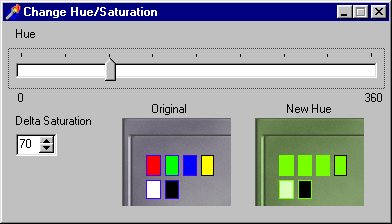
| Hue/Saturation | Change Hue/Saturation of screen shot image.
Change the TrackBar below from 0 to 360 to assign the hue to the gray
image. (Thanks to Haris I. Volos for asking how to do this.)
Before reassigning the hue of each pixel from the TrackBar, the saturation must be boosted (by the value in the SpinEditBox) in a gray image, or there isn't "enough" color (otherwise the color still appears as a "gray hue").
In the above image, each "Original" RGB pixel is converted to HSV. S is boosted by the "Delta Saturation" amount to give S'. H is assigned a new value, H', from the TrackBar. The resulting H'S'V values are converted back to the RGB values in the "New Hue" image. Complete D3 example with source code: ChangeHueSaturation.ZIP | ||||||||||||||||||||||||||||||||||||||||||||||||||||||||||||||||||||||||||||||||||||||||||||||||||||||||||||||||||||||||||||||||||||||||||||||||||||||||||
| IdentToColor | see IdentToColor on VCL/RTL page | ||||||||||||||||||||||||||||||||||||||||||||||||||||||||||||||||||||||||||||||||||||||||||||||||||||||||||||||||||||||||||||||||||||||||||||||||||||||||||
| Invert Colors in Bitmap | 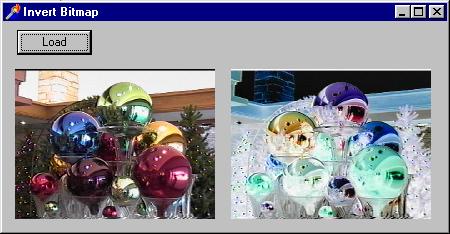
D3-D5 example of inverting pf24bit bitmap: InvertBitmap.ZIP C = 255 - R // Based on 1 June 2000 post to borland.public.delphi.multimedia
// by Robert Roßmair
...
VAR
R: TRect;
...
WITH Image1.Picture.Bitmap DO
BEGIN
R := Rect(0, 0, Width, Height);
InvertRect(Canvas.Handle, R);
END;
Image1.Invalidate
// Show bitmap (BMP file) and its color inverse in two TImages.
// Based on 1 June 2000 post to borland.public.delphi.multimedia
// by Robert Roßmair.
procedure TFormInvertBitmap.ButtonLoadBMPClick(Sender: TObject);
VAR
Bitmap: TBitmap;
begin
IF OpenPictureDialog.Execute
THEN BEGIN
Bitmap := TBitmap.Create;
TRY
Bitmap.LoadFromFile(OpenPictureDialog.Filename);
Bitmap.PixelFormat := pf24bit; // avoid using palettesImage1.Picture.Graphic := Bitmap; InvertRect(Bitmap.Canvas.Handle, Bitmap.Canvas.ClipRect);
Image2.Picture.Graphic := Bitmap
FINALLY
Bitmap.Free
END
END
end;
Also see | ||||||||||||||||||||||||||||||||||||||||||||||||||||||||||||||||||||||||||||||||||||||||||||||||||||||||||||||||||||||||||||||||||||||||||||||||||||||||||
| IsPaletteDevice | See Palette Section | ||||||||||||||||||||||||||||||||||||||||||||||||||||||||||||||||||||||||||||||||||||||||||||||||||||||||||||||||||||||||||||||||||||||||||||||||||||||||||
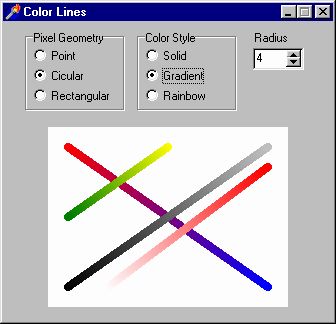
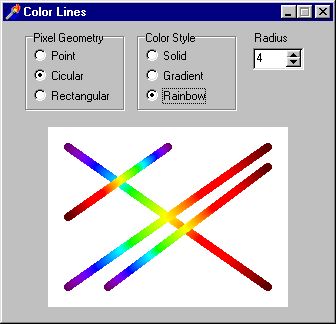
| Lines | Example of how to draw Gradient and Rainbow lines
using TBresenham class in BresenhamLibrary
unit. D4/D5 Complete Example Source Code: ColorLines.ZIP
| ||||||||||||||||||||||||||||||||||||||||||||||||||||||||||||||||||||||||||||||||||||||||||||||||||||||||||||||||||||||||||||||||||||||||||||||||||||||||||
| Map Coloring | A Look at Four- and Five-Color Algorithms, Delphi Informant, May 1999, pp. 40-47 | ||||||||||||||||||||||||||||||||||||||||||||||||||||||||||||||||||||||||||||||||||||||||||||||||||||||||||||||||||||||||||||||||||||||||||||||||||||||||||
| Maxwell Triangle |  efg's Maxwell
Triangle Lab Report efg's Maxwell
Triangle Lab Report | ||||||||||||||||||||||||||||||||||||||||||||||||||||||||||||||||||||||||||||||||||||||||||||||||||||||||||||||||||||||||||||||||||||||||||||||||||||||||||
| Monochrome bitmaps | Problem generating Monochrome bitmap http://support.microsoft.com/support/kb/articles/q149/5/85.asp | ||||||||||||||||||||||||||||||||||||||||||||||||||||||||||||||||||||||||||||||||||||||||||||||||||||||||||||||||||||||||||||||||||||||||||||||||||||||||||
| Nearest Color | See NearestColor.TXT, which shows how to find the "nearest" color in RGB space. This approach minimizes the Pythagorean distance in RGB space, but this won't be linear in color perception space. For much more information on this topic, see Differences in efg's Color Science Reference Library. | ||||||||||||||||||||||||||||||||||||||||||||||||||||||||||||||||||||||||||||||||||||||||||||||||||||||||||||||||||||||||||||||||||||||||||||||||||||||||||
| Owner-Draw Examples | A Menu Bar A Colorful Popup Menu A Colorful ComboBox A Color Selector | ||||||||||||||||||||||||||||||||||||||||||||||||||||||||||||||||||||||||||||||||||||||||||||||||||||||||||||||||||||||||||||||||||||||||||||||||||||||||||
| PaletteIndex | see PaletteIndex on VCL/RTL page | ||||||||||||||||||||||||||||||||||||||||||||||||||||||||||||||||||||||||||||||||||||||||||||||||||||||||||||||||||||||||||||||||||||||||||||||||||||||||||
| PaletteRGB | see PaletteRGB on VCL/RTL page | ||||||||||||||||||||||||||||||||||||||||||||||||||||||||||||||||||||||||||||||||||||||||||||||||||||||||||||||||||||||||||||||||||||||||||||||||||||||||||
| Palettes | Palette Functions, Tomes Graphical, pp. 403-454
For palette problems when loading DIBs from a resource file,
see | ||||||||||||||||||||||||||||||||||||||||||||||||||||||||||||||||||||||||||||||||||||||||||||||||||||||||||||||||||||||||||||||||||||||||||||||||||||||||||
| Palettes, Background Information |
Joe Hecht's UseNet Post that there is no "standard" Windows palette The Microsoft Windows Palette Manager The Palette Manager: How and Why It Does What It
Does GetPalette and PaletteChanged, pp. 211-212. Ray Lischner's "Palettes Made Plain: Demystifying Microsoft Windows Palettes" shows gradient palette and palette animation demo, Delphi Informant, July 1998. Processing WM_PALETTECHANGED and WM_QUERYNEWPALETTE Safety Palette The Hardware Palette is the color lookup table found in the hardware. A System Palette is the copy of the hardware palette maintained in software by the Palette Manager. (But actually, the hardware often does not use a palette. Windows maintains a system palette for compatibility with 256-color mode.) A Logical Palette is a Windows palette object created using the CreatePalette API call. A Foreground Palette (a logical palette) may overwrite all entries of the sysetm palette, except the static system colors. A Background Palette (a logical palette) can only set "free" entries in the system palette or map colors in the logical palette to entries in the system palette. SelectPalette: Win32 API call to mark palette as either "background" or "possibly-foreground." Reselecting a palette that is already selected causes no harm. RealizePalette: Win 32 API call that creates a mapping table -- each color in the logical palette is color-matched to every color in the system palette. "Realization" is the process of mapping a logical palette to the system palette. This process is quite involved since the Windows Palette Manager must deal with multiple applications. The foreground palette only has priority, not exclusivity. Drawing will be relative to the logical palette only after realization of the palette. Re-realizing a palette that is already realized causes no harm. Normally SelectPalette/RealizePalette occur as a pair of calls, but RealizePalette is only needed for "display" device contexts. RealizePalette is not needed for "memory" device contexts. In summary, SelectPalette is needed for all device contexts and RealizePalette is needed only for a device that really supports palette operations in hardware. "More Fun with MFC: DIBs, Palettes, Subclassing, and a Gamut of
Reusable Goodies", Part I (Jan 97), www.microsoft.com/MSJ/0197/mfcp1/mfcp1.htm More Fun With MFC: DIBs, Palettes, Subclassing and a Gamut of Goodies,
Part II (Mar 97) More Fun with MFC: DIBs, Palettes, Subclassing, and a Gamut of Goodies,
Part III (Jun 97) An 8-bit image that does not contain all the static colors in its original color table loses whatever colors could not be set directly in the system palette (but only in palette mode, i.e., 256-color display mode). IsPaletteDevice // Adapted from Joe C. Hecht's UseNet Post FUNCTION IsPaletteDevice: BOOLEAN; VAR DeviceContext: hDC; BEGIN DeviceContext := GetDC(hWnd_DeskTop); TRY RESULT := GetDeviceCaps(DeviceContext, RASTERCAPS) AND RC_PALETTE = RC_PALETTE FINALLY // Give back the screen DC ReleaseDC(0, DeviceContext) END END {IsPaletteDevice}; In The Microsoft Windows Palette Manager there is a "Does the video card support a palette?" section. The IsPaletteDevice code there checks RC_PALETTE as shown above, but further restricts the test for when the number of bits per pixel is 8. The comments there: "The only hardware modes that use a pallete are modes with 2, 4, 16 and 256 colours. Microsoft Windows supports palette operations only on displays with 256 colours. That is, in 16-colour mode, you cannot use the palette. So you only need to check for the RC_PALETTE bit if the number of bits per pixel is 8." Here's the equivalent code: FUNCTION IsPaletteDevice: BOOLEAN;
VAR
Bits : INTEGER;
DeviceContext: hDC;
ReturnCode : INTEGER;
BEGIN
DeviceContext := GetDC(hWnd_DeskTop);
TRY
bits := GetDeviceCaps(DeviceContext, BITSPIXEL) *
GetDeviceCaps(DeviceContext, PLANES);
ReturnCode := GetDeviceCaps(DeviceContext, RASTERCAPS);
FINALLY
ReleaseDC(0, DeviceContext)
END; RESULT := ((ReturnCode AND RC_PALETTE) <> 0) AND (Bits = 8)
END {IsPaletteDevice};
| ||||||||||||||||||||||||||||||||||||||||||||||||||||||||||||||||||||||||||||||||||||||||||||||||||||||||||||||||||||||||||||||||||||||||||||||||||||||||||
| Palettes, Caveats | Microsoft's Palettes Self-Study Module: "... many, if not most, devices are not palette capable. Low-end devices such as VGA just can't display enough colors at one time to be palette "aware." High-end devices can display so many colors that they don't need to be palette aware. These factors severely limit the market for applications reliant on palette manipulation." (Microsoft moved this link -- I'm still looking for it) Danny Thorpe's UseNet Post about why transparency often fails on paletted devices | ||||||||||||||||||||||||||||||||||||||||||||||||||||||||||||||||||||||||||||||||||||||||||||||||||||||||||||||||||||||||||||||||||||||||||||||||||||||||||
| Palettes, Creation | Joe Hecht's UseNet
Post about Bug in D4 (fixed in D5)
see Create a gray-scale palette, Delphi in a Nutshell, p. 19 Gradient Palettes, Halftone Palette, 22 FracInt .PAL files , See Scanline Tech Note for pf8bit bitmaps with palettes
efg's UseNet Post about converting 256-color bitmap to pf1bit David Ullrich's UseNet Post
about Gray and Black/White Palettes | ||||||||||||||||||||||||||||||||||||||||||||||||||||||||||||||||||||||||||||||||||||||||||||||||||||||||||||||||||||||||||||||||||||||||||||||||||||||||||
| Palettes, Examples | Scramble Palette Example
\Program Files\Borland\Delphi n\HELP\Examples\Bitmap\BMPFormU.PAS Creating a palette with more than one entry (FAQ 890D) Damon Chandler's (Team B) UseNet Post
about modifying a palette. Ray Lischner's Palette Animation Demo, pal10.zip at www.tempest-sw.com/freeware or via ftp at ftp://ftp.tempest-sw.com/pub/delphi/pal10.zip, Delphi 1. Ray Lischner's "Palettes Made Plain: Demystifying Microsoft Windows Palettes" shows gradient palette and palette animation demo, Delphi Informant, July 1998. Palette Management in VCL Components, Visual Developer, pp. 110-113, Builder C++ example, www.visual-developer.com/code/vdm/vdmv9n2.zip Wandlung in Graustufen und Ändern der Palette How to respond to QueryNewPalette and PaletteChanged messages Screen Capture Laurie's UseNet Post with Change256ColorBitmapPalette procedure Sean Dockery's UseNet Post asking how to reliably get windowed controls to abide by changes to the system palette. (Sean's examples are very good, but his question went unanswered.) PALDEMO1. A tutorial program by Eric Engler that shows you how to
handle Windows palette messages in a 256 color screen mode. Delphi
1. Palette Experiments, pp. 296-311, Delphi 2 Multimedia. (out of print) "Working with Color Palettes," pp. 209-211, How
to Program Delphi 3 (out of print) | ||||||||||||||||||||||||||||||||||||||||||||||||||||||||||||||||||||||||||||||||||||||||||||||||||||||||||||||||||||||||||||||||||||||||||||||||||||||||||
| Palettes, Multiple Images | Several options should be considered if an
application needs more than one palette-based image at at time:
| ||||||||||||||||||||||||||||||||||||||||||||||||||||||||||||||||||||||||||||||||||||||||||||||||||||||||||||||||||||||||||||||||||||||||||||||||||||||||||
| Palettes, Optimized | Optimized Palettes, Color Reduction,
Color Quantization: Color problems in 256 color mode (FAQ 2780D) (Pen and text don't match brush) Color reduction techniques for graphics (FAQ 972D) [weak answer] Compressing 256 Colour Bitmaps by Grahame Marsh, www.undu.com/Articles/980311b.htm Gervautz-Purgathofer Octree Color Quantization algorithm adapted from October 1997 Microsoft Systems Journal (www.microsoft.com/MSJ/1097/MSJoct97.zip). See efg's ShowDemoOne Lab Report or www.geocities.com/Athens/Delphi/9072/download.htm#genpal ReduceColors function. See Anders Melander's UseNet Post about using TGIFImage to reduce colors.
efg's Color Reference Library | ||||||||||||||||||||||||||||||||||||||||||||||||||||||||||||||||||||||||||||||||||||||||||||||||||||||||||||||||||||||||||||||||||||||||||||||||||||||||||
| Palettes, VGA | While VGA hardware does have a palette-based design, the number of available colors (64) and the number of hardware palette entries (16) are too limiting for use by the Palette Manager. So the Windows VGA driver does not support palettes and uses a fixed color table of 16 colors. | ||||||||||||||||||||||||||||||||||||||||||||||||||||||||||||||||||||||||||||||||||||||||||||||||||||||||||||||||||||||||||||||||||||||||||||||||||||||||||
| PixelProfile | RGB or HSV Pixel Profile in Image efg's PixelProfile
Lab Report efg's PixelProfile
Lab Report | ||||||||||||||||||||||||||||||||||||||||||||||||||||||||||||||||||||||||||||||||||||||||||||||||||||||||||||||||||||||||||||||||||||||||||||||||||||||||||
| Print Image | How can I Print a Bitmap? Item 1
on Delphi
Printing Info and Links page
efg's Printer Demo #1 Print In Color (FAQ 1650D) | ||||||||||||||||||||||||||||||||||||||||||||||||||||||||||||||||||||||||||||||||||||||||||||||||||||||||||||||||||||||||||||||||||||||||||||||||||||||||||
| RGB | see RGB on VCL/RTL page | ||||||||||||||||||||||||||||||||||||||||||||||||||||||||||||||||||||||||||||||||||||||||||||||||||||||||||||||||||||||||||||||||||||||||||||||||||||||||||
| RGBTripleToColor | FUNCTION RGBTripleToColor(CONST Triple: TRGBTriple): TColor;
BEGIN
RESULT := RGB(Triple.rgbtRed, Triple.rgbtGreen, Triple.rgbtBlue)
END {RGBTripleToColor}; | ||||||||||||||||||||||||||||||||||||||||||||||||||||||||||||||||||||||||||||||||||||||||||||||||||||||||||||||||||||||||||||||||||||||||||||||||||||||||||
| SetDIBColorTable | efg's Graphics WinAPI page | ||||||||||||||||||||||||||||||||||||||||||||||||||||||||||||||||||||||||||||||||||||||||||||||||||||||||||||||||||||||||||||||||||||||||||||||||||||||||||
| SetSysColors | efg's Graphics WinAPI page | ||||||||||||||||||||||||||||||||||||||||||||||||||||||||||||||||||||||||||||||||||||||||||||||||||||||||||||||||||||||||||||||||||||||||||||||||||||||||||
| SetSystemPaletteUse | see Palettes | ||||||||||||||||||||||||||||||||||||||||||||||||||||||||||||||||||||||||||||||||||||||||||||||||||||||||||||||||||||||||||||||||||||||||||||||||||||||||||
| Spectrum/Rainbow | Painting a rainbow color spectrum onto a form (FAQ
1247D)
Eddie Shipman's UseNet Post about making a rainbow background on a form
Also, see "Color Gradients". | ||||||||||||||||||||||||||||||||||||||||||||||||||||||||||||||||||||||||||||||||||||||||||||||||||||||||||||||||||||||||||||||||||||||||||||||||||||||||||
| StringToColor | see StringToColor on VCL/RTL page | ||||||||||||||||||||||||||||||||||||||||||||||||||||||||||||||||||||||||||||||||||||||||||||||||||||||||||||||||||||||||||||||||||||||||||||||||||||||||||
| System Colors | Microsoft Windows reserves 20 "static" colors in
the system palette. The system colors cannot be changed (but can be
reduced from 20 to 2 using the SetSystemPaletteUse API call --
this should be avoided since some video drivers behave strangely when the
20 static colors are no longer fixed).
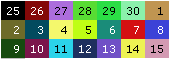
System Palette and Static Colors According to the Microsoft Systems Journal, Sept. 91, p. 119, the table below is the Windows 3.0 Default Palette. These colors should never dither in 256-color mode. The placement of the static colors is at the beginning and end of the palette table so that common raster operations such as XOR will behave correctly. With the static colors in slots 0..9 and 246..255, the inverse index of one of the static colors results in another static color. The colors marked with an asterisk (*) below are part of Windows 95 "theme" colors. So these specific theme colors may not be defined in all configurations of Windows.
I am not sure why RxLib uses different definitions for clSkyBlue and clCream than the values given by Microsoft. Printing System Colors using various brush styles: efg's Printer Demo #2 | ||||||||||||||||||||||||||||||||||||||||||||||||||||||||||||||||||||||||||||||||||||||||||||||||||||||||||||||||||||||||||||||||||||||||||||||||||||||||||
| TColor | see efg's Delphi Graphics VCLRTL page | ||||||||||||||||||||||||||||||||||||||||||||||||||||||||||||||||||||||||||||||||||||||||||||||||||||||||||||||||||||||||||||||||||||||||||||||||||||||||||
| TColorSpeedBtn | Robert Rossmair's UseNet
Post with ClrSpBtn unit (a TSpeedButton descendant that has a Color property) | ||||||||||||||||||||||||||||||||||||||||||||||||||||||||||||||||||||||||||||||||||||||||||||||||||||||||||||||||||||||||||||||||||||||||||||||||||||||||||
| TDBGrid | Colorizing a TDBGrid http://community.borland.com/article/0,1410,20845,00.html | ||||||||||||||||||||||||||||||||||||||||||||||||||||||||||||||||||||||||||||||||||||||||||||||||||||||||||||||||||||||||||||||||||||||||||||||||||||||||||
| TPageControl/ TTabSheet Color | Lou's Tip: http://members.truepath.com/delphi/tips/tip85_tpagecontrolttabsheetcolor1.htm | ||||||||||||||||||||||||||||||||||||||||||||||||||||||||||||||||||||||||||||||||||||||||||||||||||||||||||||||||||||||||||||||||||||||||||||||||||||||||||
| TRGBQuad, TRGBTriple | see VCL/RTL page | ||||||||||||||||||||||||||||||||||||||||||||||||||||||||||||||||||||||||||||||||||||||||||||||||||||||||||||||||||||||||||||||||||||||||||||||||||||||||||
| Vectorscope | efg's
Vectorscope
Delphi 6 project dynamically draws the vectorscope diagram below:
From www.seanet.com/Users/bradford/ntscvideo.html: Also see: www.tektronix.com/Measurement/App_Notes/NTSC_Video_Msmt/vectorscope.html Check the Show Color Chart box to see the following diagram overlaid on the above.
Thanks to Richard Jungert for coaching me through this project. | ||||||||||||||||||||||||||||||||||||||||||||||||||||||||||||||||||||||||||||||||||||||||||||||||||||||||||||||||||||||||||||||||||||||||||||||||||||||||||
| WM_SYSCOLOR CHANGE |
see Messages
on efg's Delphi Graphics
Win32
API page
Color Messages
| ||||||||||||||||||||||||||||||||||||||||||||||||||||||||||||||||||||||||||||||||||||||||||||||||||||||||||||||||||||||||||||||||||||||||||||||||||||||||||
| WM_PALETTE CHANGED | |||||||||||||||||||||||||||||||||||||||||||||||||||||||||||||||||||||||||||||||||||||||||||||||||||||||||||||||||||||||||||||||||||||||||||||||||||||||||||
| WM_QUERY NEWPALETTE | |||||||||||||||||||||||||||||||||||||||||||||||||||||||||||||||||||||||||||||||||||||||||||||||||||||||||||||||||||||||||||||||||||||||||||||||||||||||||||
| XORing Colors | Howard Moon's UseNet
Post about XOR for TColor
See alternative to XORing, | ||||||||||||||||||||||||||||||||||||||||||||||||||||||||||||||||||||||||||||||||||||||||||||||||||||||||||||||||||||||||||||||||||||||||||||||||||||||||||
Note:
Foley96
(referenced above in several places) is not a Delphi book,
but is an
excellent source for computer graphics algorithms.
Links Verified 6 Feb 2000
Updated 18
Dec 2001
since 6
Feb 2000









 efg's
efg's